
10 Benefits of Employee Monitoring Software for Modern Businesses
Modern businesses face a major challenge: understanding how work gets done without constantly supervising employees. With remote teams, hybrid workplaces, and digital collaboration tools becoming part of everyday operations, managers need better ways to understand workflows, identify inefficiencies, and support employees.
This is where employee monitoring software can provide value.
Rather than relying entirely on manual updates or assumptions, businesses can use work-related activity data to understand software usage, identify workflow challenges, and make informed operational decisions.
However, effective monitoring is not about watching every action an employee takes. It is about gathering relevant information, respecting employee privacy, and using insights to improve workplace processes.
In this guide, we'll explore the 10 benefits of employee monitoring software, explain its potential limitations, and discuss how solutions like Octopus can support workforce visibility and management.
Why Businesses Use Employee Monitoring Software
Employee monitoring software helps organizations collect and analyze information about work-related computer activity.
Depending on the platform, an employee monitoring system may provide insights into application usage, website activity, workstation status, activity patterns, and productivity-related reports.
Modern organizations use these tools for several reasons:
Managing remote and hybrid teams.
Understanding digital workflows.
Identifying operational bottlenecks.
Reviewing software and application usage.
Supporting workforce planning.
Improving accountability and communication.
Making better use of workplace technology.
For example, a company managing 30 remote employees may struggle to understand which applications are essential to daily operations or whether its workflows contain unnecessary steps.
Employee activity tracking can provide useful information about these patterns.
However, managers should interpret this information alongside completed work, employee feedback, and actual business outcomes.
Employee Monitoring vs Traditional Workforce Management
Traditional workforce management often depends on attendance records, spreadsheets, timesheets, and periodic performance reviews.
Employee monitoring software adds another source of information by collecting digital activity data.
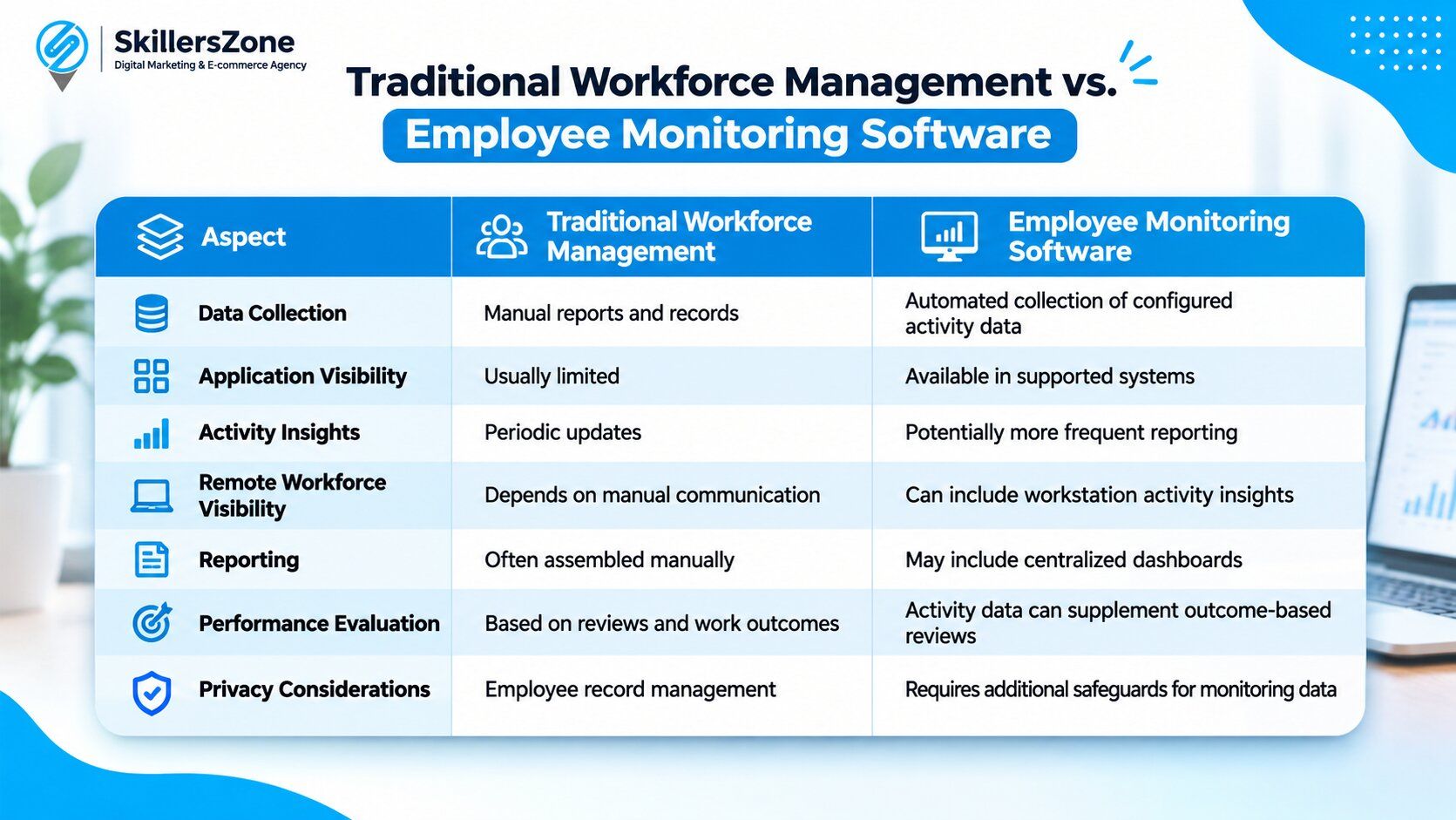
Important: Employee monitoring software should complement effective management practices, not replace communication, trust, or outcome-based performance evaluation.
10 Potential Benefits for Teams and Managers
The following employee monitoring benefits are potential advantages, not guaranteed results. Their value depends on organizational needs, implementation methods, monitoring policies, and how managers use the collected information.
1. Better Visibility Into Daily Workflows
One of the primary benefits of employee monitoring software is improved visibility into digital workplace activities.
Managers often understand what projects employees are working on but have limited information about the applications or systems involved.
Employee monitoring tools can provide a clearer picture of how workplace software is used.
For example, an operations manager may discover that employees frequently switch between multiple applications to complete a single task.
This pattern could indicate an opportunity to simplify the workflow or introduce better-integrated software.
Business value: Better visibility can help organizations identify process inefficiencies and investigate workflow challenges.
However, application activity should not be interpreted as a complete record of work performed.
2. More Informed Workforce Productivity Decisions
Improving workforce productivity requires understanding how employees complete tasks and what obstacles affect their performance.
Employee monitoring software may provide activity timelines, application reports, and other operational information that supports productivity discussions.
For example, a manager might identify that employees regularly spend substantial time navigating between different business platforms.
Instead of assuming employees are working inefficiently, the manager could investigate whether the company's tools create unnecessary administrative work.
This approach focuses on improving the working environment rather than simply demanding more activity.
Business value: Activity insights can help managers identify opportunities to improve processes, training, and resource allocation.
True productivity should still be evaluated through relevant results, quality standards, and business outcomes.
3. Improved Management of Remote and Hybrid Teams
Remote work creates new challenges for workforce coordination.
Managers may oversee employees working in different locations, using different applications, and following flexible schedules.
Employee monitoring software can provide additional information about work-related computer activity across distributed teams.
For example, a remote operations team may use several applications for communication, customer support, and project management.
Monitoring reports can help managers understand application usage patterns and identify potential technical or workflow issues.
However, remote employees should not be expected to demonstrate productivity through constant keyboard activity or continuous screen interaction.
Business value: Monitoring data can support remote team management when combined with clear objectives, regular communication, and reasonable expectations.
4. Better Understanding of Application Usage
Businesses often invest in multiple software subscriptions without fully understanding how employees use them.
Employee application monitoring can help organizations evaluate the role different applications play in their workflows.
For example, a marketing agency might use design tools, project management software, document platforms, and communication applications.
Usage reports may help the agency identify applications that require additional training or investigation.
Low usage does not automatically mean a subscription is unnecessary. Some specialized applications may be used infrequently but remain essential.
Business value: Application insights can support software investment, training, and technology planning decisions.
5. Easier Identification of Workflow Bottlenecks
A workflow bottleneck occurs when a process, tool, or dependency slows down work.
These problems are not always visible through ordinary performance reports.
Employee activity tracking may reveal recurring patterns that deserve further investigation.
For instance, employees might repeatedly switch between a customer relationship management platform and a spreadsheet to update the same information.
This may indicate duplicated administrative work.
A manager could investigate whether the systems can be integrated or whether the process can be simplified.
Business value: Relevant activity patterns can help identify opportunities for workflow improvement.
Monitoring data should be treated as a starting point for investigation, not proof that a particular employee or process is responsible for a problem.
6. More Structured Workforce Reporting
Manual workforce reporting can be time-consuming, particularly for organizations managing multiple teams and devices.
Employee monitoring systems may organize available activity information into dashboards, charts, or historical reports.
Depending on the product, these reports can present:
Application usage patterns.
Browser activity records.
Workstation information.
Computer activity trends.
Activity summaries across reporting periods.
This information may help managers review relevant operational trends without manually compiling every record.
Business value: Centralized reporting can make workplace activity information easier to review and interpret.
Nevertheless, organizations should avoid generating excessive reports that create additional administrative work without meaningful business value.
7. Better Planning of Workforce Resources
Workforce planning involves assigning people, tools, and technology to business activities effectively.
Employee monitoring software can contribute relevant information to this process.
For example, a team may experience repeated interruptions while using a business application.
Activity reports, combined with employee feedback and technical support information, may help management investigate the cause.
The organization might discover that employees need additional training or that the software requires configuration improvements.
Business value: Operational insights can support more informed decisions about tools, training, and workflow resources.
Managers should avoid using individual activity comparisons as the only basis for staffing or scheduling decisions.
8. More Consistent Operational Reviews
Organizations need reliable information when reviewing changes in workplace processes.
Employee monitoring data can supplement other operational indicators by showing how certain digital activity patterns change over time.
For example, a company introduces a new project management system.
After implementation, managers can review relevant application usage information and ask employees whether the new system has improved their workflow.
The company should also evaluate project delivery times, work quality, and employee experience.
Business value: Monitoring information can provide additional context when evaluating operational changes.
However, higher activity levels do not necessarily indicate successful implementation.
9. Improved Visibility for IT and Workstation Administration
Companies managing multiple workplace computers may benefit from centralized workstation information.
Some employee monitoring tools provide device identity, status, synchronization details, and related administrative information.
These capabilities can help authorized administrators understand which monitored workstations are reporting information and whether particular devices require attention.
For example, an IT administrator may identify a workstation that has stopped synchronizing with the monitoring platform.
This could prompt an appropriate technical check.
Business value: Workstation visibility can support administrative oversight and technical troubleshooting.
It should not be confused with complete endpoint security, antivirus protection, or comprehensive IT asset management unless the software explicitly includes those capabilities.
10. More Informed Management Conversations
Perhaps one of the most useful employee monitoring benefits is the opportunity to support management discussions with relevant operational information.
Rather than making assumptions about employee behavior, managers can investigate workflow patterns and discuss them with the people performing the work.
For example, activity records may suggest that an employee frequently changes applications during a task.
A constructive discussion might reveal that the employee is dealing with a complicated approval process or using several tools to complete a necessary workflow.
The result could be process improvement rather than criticism.
Business value: Monitoring insights can contribute to constructive conversations when management emphasizes context, employee feedback, and fair treatment.
Businesses can use employee monitoring software to improve workforce visibility, understand productivity patterns, and identify operational challenges.
Summary: 10 Benefits of Employee Monitoring Software
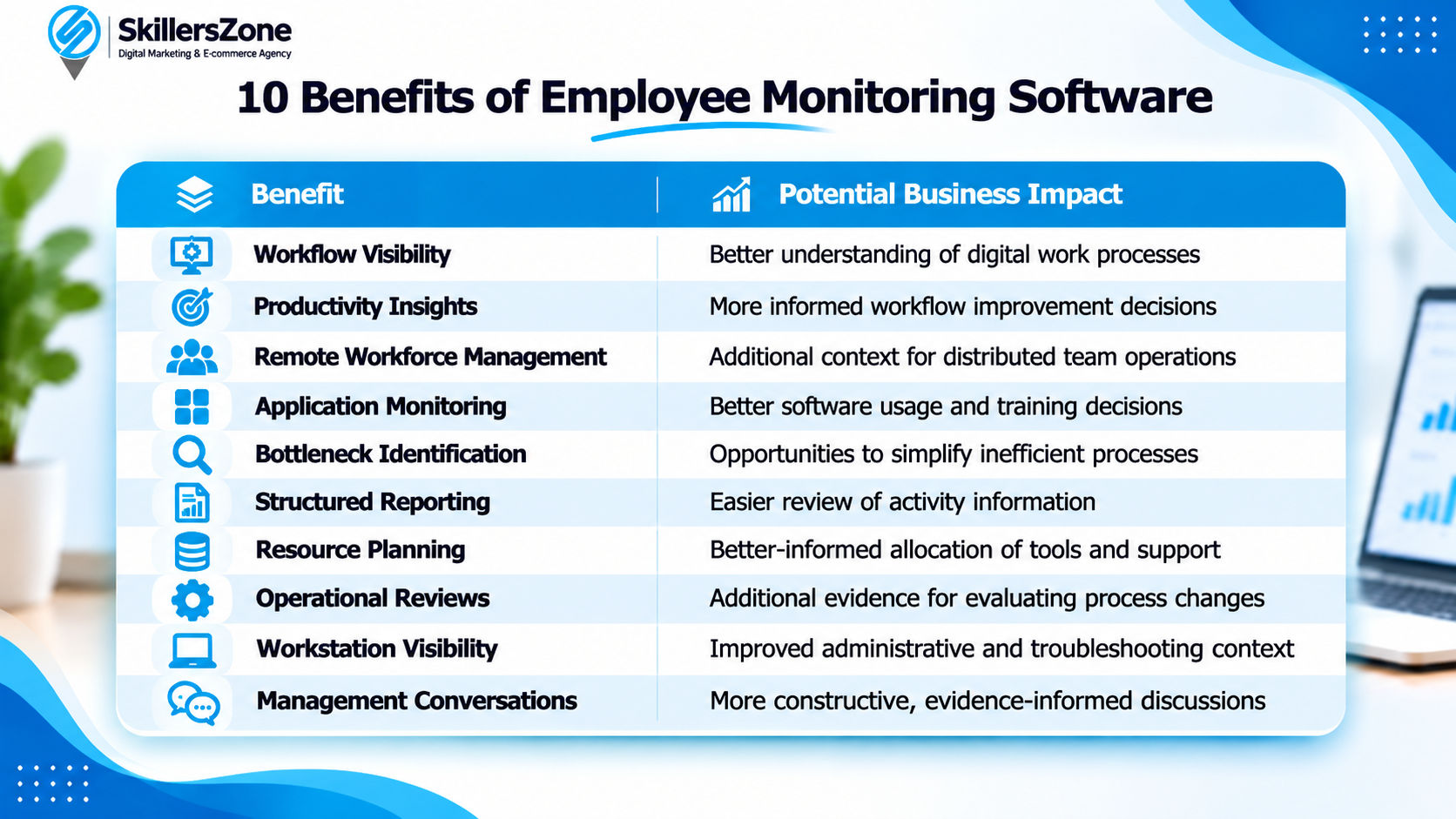
These benefits are most likely to be useful when monitoring is proportionate, transparent, and aligned with a legitimate organizational need.
When Monitoring Can Become Counterproductive
Although employee monitoring software offers potential advantages, inappropriate monitoring can create problems.
Organizations should recognize that collecting more information does not automatically improve management decisions.
Excessive Monitoring Can Reduce Trust
Employees may feel uncomfortable when monitoring practices are unclear or unnecessarily intrusive.
A lack of transparency can create uncertainty about how collected information will be used.
Managers should explain why monitoring is necessary and establish clear boundaries.
Activity Does Not Equal Productivity
A common mistake is treating computer activity as a direct measurement of work quality.
For example, an employee attending a productive customer meeting may generate little computer activity.
Meanwhile, an employee completing repetitive tasks may generate extensive activity without necessarily producing better outcomes.
Businesses should evaluate employee performance using appropriate job-specific criteria.
Monitoring Data Can Be Misinterpreted
An activity report may show that a particular application was inactive.
However, the employee might have been reviewing printed documents, speaking with a customer, or performing another legitimate task.
Without additional context, monitoring data can lead to inaccurate conclusions.
Excessive Data Collection Creates Privacy Risks
Monitoring platforms may collect information containing confidential business details or personal data.
Screenshots, browser records, and other detailed activity information require appropriate safeguards.
Organizations should establish access restrictions, retention limits, and clear procedures for handling monitoring records.
Monitoring Can Create Additional Administrative Work
A business may collect large amounts of data without having a clear plan for using it.
Reviewing unnecessary reports consumes management time.
Organizations should focus on information that supports specific operational decisions.
Key takeaway: Employee monitoring is most effective when it supports better workflows and responsible decision-making rather than constant supervision.
Best Practices for Transparent Implementation
Businesses should develop a clear implementation strategy before introducing employee monitoring software.
The following practices can help organizations balance operational visibility with employee privacy and trust.
1. Define a Legitimate Business Purpose
Start by identifying exactly why monitoring is needed.
For example, a company may need better workstation administration, application usage insights, or workflow reporting.
Avoid deploying unnecessary monitoring features without a clear business justification.
2. Create a Written Employee Monitoring Policy
A monitoring policy should explain:
What information will be collected.
Why monitoring is necessary.
Which devices and work activities are covered.
When monitoring will take place.
Who can access the information.
How long records will be retained.
How employees can raise concerns.
The policy should be understandable and accessible to affected employees.
3. Communicate Before Monitoring Begins
Employees should receive clear information about monitoring practices before implementation.
Legal requirements relating to employee notice, consent, workplace surveillance, and personal information differ by jurisdiction.
Businesses operating in the United States should review relevant federal and state requirements and consult qualified legal professionals where necessary.
4. Use Data Minimization
Collect only the information reasonably necessary for the stated business purpose.
For example, if application usage summaries provide sufficient information, detailed screenshots or other intrusive monitoring methods may not be justified.
Organizations should also consider how to avoid collecting sensitive personal information.
5. Establish Appropriate Access Controls
Only authorized personnel should be allowed to review monitoring records.
Businesses should evaluate software providers' authentication, role permissions, encryption, retention, and data deletion capabilities.
6. Combine Monitoring Data With Business Outcomes
Do not evaluate employees using activity reports alone.
Consider additional factors such as:
Completed work and deliverables.
Quality and accuracy.
Customer satisfaction.
Project deadlines.
Collaboration and communication.
Employee feedback.
This approach provides a more balanced view of workforce productivity.
7. Review Monitoring Practices Regularly
Workplace requirements change over time.
Organizations should periodically assess whether monitoring methods remain necessary, whether collected information is useful, and whether employees have appropriate opportunities to raise concerns.
How Octopus Supports Workforce Visibility
Octopus is an employee monitoring and workforce management software solution developed by SkillersZone LLC.
The platform is designed to provide centralized visibility into work-related computer activities and workstation information.
For businesses exploring employee activity tracking, Octopus offers several relevant capabilities.
Application Activity Monitoring
Octopus provides application activity information that can help authorized administrators understand how workplace software is used.
These insights may support operational reviews, workflow analysis, and technology planning.
Browser Activity Monitoring
Browser activity monitoring provides visibility into relevant website activity on configured workstations.
Organizations should use these capabilities according to clear monitoring policies and applicable privacy requirements.
Screenshot Management
Octopus includes screenshot-related monitoring functionality and administrative controls.
Businesses evaluating this feature should review its available configuration options, permissions, data handling practices, and whether screenshots are appropriate for their particular use cases.
Centralized Monitoring Dashboard
Octopus provides a dashboard interface for viewing available workforce monitoring information.
Depending on configuration and enabled features, authorized users can review relevant activity data and workstation information through a centralized system.
Workstation Visibility
Octopus includes workstation information that supports visibility into monitored workplace devices.
This may assist administrators when reviewing workstation status and related operational records.
Is Octopus Right for Your Business?
Octopus may be worth evaluating if your organization needs:
Centralized visibility into workplace computer activity.
Application and browser activity monitoring.
Configurable screenshot monitoring.
Workstation information and monitoring reports.
A dashboard for reviewing relevant workforce activity data.
Before selecting the platform, review its current feature availability, security documentation, supported environments, pricing, and privacy controls.
A product demonstration can help determine whether Octopus meets your operational requirements.
Frequently Asked Questions About Employee Monitoring Software
1. What are the main benefits of employee monitoring software?
The main potential benefits include improved workflow visibility, better application usage insights, structured activity reporting, support for remote team management, and more informed operational decisions.
Actual results depend on how the software is implemented and used.
2. Does employee monitoring software improve productivity?
Employee monitoring software can help identify workflow problems and provide information that supports productivity improvements.
However, installing monitoring software does not automatically make employees more productive.
Effective improvements depend on management practices, employee support, workflow design, and meaningful performance measures.
3. Is employee activity tracking suitable for remote teams?
Employee activity tracking can provide useful operational context for remote teams when implemented transparently.
Remote productivity should still be evaluated primarily through relevant work outcomes, quality, and collaboration rather than computer activity alone.
4. Can employee monitoring software reduce business costs?
Monitoring information may help businesses identify inefficient processes, unnecessary administrative work, or opportunities to review software usage.
Any cost savings depend on whether the organization acts on reliable findings and achieves measurable improvements.
5. What are the disadvantages of employee monitoring software?
Potential disadvantages include privacy concerns, reduced employee trust, incorrect interpretation of activity data, increased administrative workload, and additional data security responsibilities.
Clear policies and proportional monitoring can help reduce these risks.
6. Is employee monitoring software legal in the United States?
Employee monitoring may be permissible in certain workplace contexts, but requirements vary depending on federal and state laws, monitoring methods, devices, and the information collected.
Employers should review applicable notice, consent, privacy, and employment requirements before implementation.
7. What should small businesses look for in employee monitoring software?
Small businesses should consider ease of use, relevant monitoring features, clear reporting, security, privacy controls, support, implementation requirements, and overall cost.
The right solution should match a genuine operational need.
8. What is the difference between employee monitoring and workforce productivity management?
Employee monitoring focuses on collecting and reviewing certain work-related activity information.
Workforce productivity management is broader and involves improving processes, resources, performance outcomes, training, and collaboration.
Monitoring information can support productivity management, but it cannot replace it.
Final Thoughts
The benefits of employee monitoring software extend beyond simply observing computer activity.
When used responsibly, employee monitoring tools can help organizations understand digital workflows, evaluate application usage, identify operational challenges, and support more informed management decisions.
However, effective monitoring requires clear objectives, employee transparency, responsible data collection, and appropriate interpretation of activity information.
Businesses should focus on improving work processes and outcomes rather than measuring employees solely by how active their computers appear.
For modern businesses managing office-based, remote, or hybrid teams, the right monitoring platform can provide valuable operational visibility while supporting a thoughtful approach to workforce management.
Discover Octopus Workforce Monitoring Features
Looking for a practical way to understand workplace computer activity and manage workforce monitoring information?
Octopus Employee Monitoring Software, developed by SkillersZone LLC, provides application and browser activity monitoring, screenshot management, workstation visibility, and centralized monitoring dashboards.
Explore how Octopus can support your organization's operational visibility and workforce management requirements.
Discover Octopus Workforce Monitoring Features
Explore the Software | Request a Product Demo
Developed by: SkillersZone LLC