
What Is Employee Monitoring Software? A Complete Guide for 2027
Managing employee productivity has become more complex as businesses adopt remote work, hybrid schedules, and digital workflows. While modern technology makes collaboration easier, it also creates challenges for managers who need to understand how work gets done, identify operational inefficiencies, and maintain accountability across distributed teams.
This is where employee monitoring software can help.
An employee monitoring system provides visibility into workplace computer activity, application usage, website activity, and other work-related information. When implemented responsibly, these tools can help organizations identify workflow challenges, improve resource allocation, and make more informed management decisions.
However, monitoring employees is not simply about tracking their computer activity. Businesses must also consider transparency, privacy, security, and whether the information collected genuinely supports better outcomes.
In this complete 2027 guide, we'll explain how employee monitoring software works, explore its key features, examine its benefits and limitations, and help you choose the right solution for your organization.
What Is Employee Monitoring Software?
Employee monitoring software is a digital solution that helps organizations collect and analyze work-related activity data from employee devices or designated workplace systems.
Depending on the software, this information may include:
Application usage and active software windows.
Work-related website activity.
Computer activity patterns.
Screenshots captured under configured monitoring policies.
Workstation status and device information.
Productivity reports and activity dashboards.
Work-related time and activity trends.
An employee monitoring system organizes this information into reports that authorized managers and administrators can review.
For example, a company managing a distributed customer support team may want to understand whether employees have access to the necessary applications, how frequently workflow interruptions occur, and whether certain processes create unnecessary delays.
Rather than relying entirely on assumptions, managers can use relevant activity data alongside work quality and customer service metrics to identify potential improvements.
Employee Monitoring vs Employee Tracking
The terms employee monitoring software and employee tracking software are often used interchangeably, but their functionality may differ.
Employee monitoring generally focuses on observing and analyzing work-related activity, while employee tracking can include time records, task progress, attendance, or location information.
Some platforms provide both capabilities. Others specialize in particular areas, such as computer activity monitoring or workforce productivity analytics.
The right choice depends on your organization's operational needs.
How Does Employee Monitoring Software Work?
Employee monitoring software typically uses a desktop application, device agent, browser integration, or other authorized monitoring method to collect workplace activity information.
The exact process varies by provider, but most computer-based systems follow several common stages.
1. Software Installation and Configuration
An organization deploys the monitoring application on approved workplace devices.
Administrators configure relevant settings, such as which activities should be collected, who can access the information, and when monitoring is permitted.
Before deployment, organizations should notify employees, establish an appropriate monitoring policy, and review applicable legal requirements.
2. Activity Data Collection
Once configured, the software may collect information about application usage, browser activity, active windows, or workstation status.
For example, a monitoring system might record that a work-related application was active during a particular period.
However, an active application does not necessarily mean an employee was productive, just as an inactive computer does not necessarily mean an employee was not working.
This distinction is important when interpreting monitoring results.
3. Data Processing and Organization
The monitoring platform processes collected information and organizes it into reports, charts, timelines, or activity records.
Depending on the product, the information may be displayed by workstation, employee, team, application, or reporting period.
4. Dashboard Reporting
Authorized managers can use dashboards to review available activity information.
A workforce monitoring software dashboard may help organizations understand:
Which business applications are used frequently.
How computer activity varies throughout the workday.
Whether application usage patterns change over time.
Where potential workflow interruptions occur.
Whether certain teams may benefit from additional support or training.
5. Management Review and Improvement
The final step should involve interpreting the information responsibly.
Managers can compare relevant activity patterns with actual business outcomes, discuss concerns with employees, and make operational adjustments when appropriate.
The purpose of effective employee monitoring should be to support better management decisions, not to automatically equate computer activity with employee performance.
Key Features of Employee Monitoring Tools
Not every employee monitoring system provides the same capabilities. Understanding common software features helps businesses select a solution that meets their needs without collecting unnecessary information.
1. Employee Activity Monitoring
Employee activity monitoring provides visibility into work-related computer activity.
Depending on the software configuration, activity information may include application focus, workstation status, and time-based usage patterns.
This can help managers identify trends, but activity levels should never be treated as a complete measure of employee performance.
2. Application Usage Monitoring
Application monitoring helps organizations understand which software employees use during their work.
For instance, a marketing team may regularly use design software, project management platforms, and communication applications.
Application usage reports can help managers identify opportunities for better software training, workflow optimization, and technology investment.
3. Website and Browser Activity Monitoring
Browser monitoring provides information about website activity on designated workplace devices, depending on configured permissions and product capabilities.
These insights can help organizations understand how web-based tools contribute to daily operations.
However, responsible monitoring should avoid unnecessarily collecting personal browsing information, passwords, or sensitive content.
4. Screenshot Monitoring
Some employee monitoring tools can capture workstation screenshots according to configured schedules or monitoring rules.
Screenshots may provide context for troubleshooting or understanding particular workflows.
However, screenshots can also contain confidential business information or personal data.
Organizations should carefully consider whether screenshots are necessary, who can access them, how long they are retained, and whether sensitive information can be excluded.
5. Workforce Productivity Dashboard
A productivity dashboard brings relevant monitoring information into a centralized interface.
Depending on the platform, it may display activity trends, application usage, reporting periods, and workstation information.
These dashboards can help managers recognize patterns and investigate operational issues.
For meaningful performance evaluation, dashboard information should be considered alongside completed work, quality standards, customer outcomes, and employee feedback.
6. Workstation Monitoring
Workstation monitoring helps administrators view relevant device or workstation information.
This may include device identity, connection status, synchronization information, or other system details.
Such information can be useful when organizations manage multiple workstations across different locations.
7. Reporting and Analytics
Reporting tools transform collected information into organized summaries.
Managers may use these reports to understand longer-term activity trends, compare reporting periods, or evaluate whether workflow changes have improved operational efficiency.
How Octopus Supports Workforce Visibility
Octopus, developed by SkillersZone LLC, is an employee monitoring and workforce management software solution designed to provide visibility into workplace computer activity.
Its product capabilities include application and browser activity monitoring, workstation information, screenshot management, and dashboard-based reporting.
Octopus can help authorized administrators review relevant workplace activity information through a centralized interface.
For businesses evaluating a monitoring solution, an Octopus demonstration can help clarify how its available features, configuration options, and reporting workflows fit their requirements.
Benefits and Limitations for Modern Businesses
Employee monitoring software can provide useful operational information, but its value depends on how the organization implements and interprets it.
Potential Benefits of Employee Monitoring Software
1. Improved Workflow Visibility
Managers can gain a clearer understanding of how digital tools support day-to-day operations.
This visibility may help identify inefficient workflows or repeated interruptions.
2. Better Resource Planning
Application and workstation activity information may help organizations understand which tools and resources teams use most often.
These insights can support decisions about training, software subscriptions, and operational investments.
3. Stronger Remote Team Management
Remote teams often work across multiple locations and schedules.
Appropriate monitoring tools can supplement project updates, team meetings, and performance reviews with relevant operational information.
4. Data-Informed Management Decisions
Activity reports can help managers investigate potential issues before deciding whether changes are needed.
For example, changes in software usage may indicate a new workflow, additional training needs, or an operational problem.
5. Improved Process Evaluation
Organizations can compare relevant workflow patterns before and after implementing new tools or processes.
This can help identify whether changes have reduced unnecessary administrative work.
6. Greater Operational Transparency
When employees understand what is being monitored and why, clearly communicated monitoring practices can create more consistent expectations.
However, monitoring itself does not guarantee trust. Transparency and respectful management remain essential.
Limitations of Employee Monitoring Software
Despite its potential benefits, monitoring software has important limitations.
Computer activity is not the same as productivity.
An employee may be highly productive while reading, planning, speaking with customers, or collaborating away from a computer.
Similarly, frequent keyboard or application activity does not necessarily indicate valuable work.
Other limitations include:
Incomplete visibility into offline work.
Possible misinterpretation of activity reports.
Employee privacy concerns.
Potential effects on workplace trust and morale.
Data security and retention responsibilities.
Additional administrative work.
Businesses should avoid using activity measurements as the sole basis for performance ratings or disciplinary decisions.
A Practical Example
Consider two employees working on different assignments.
Employee A spends most of the day using a spreadsheet application.
Employee B spends several hours discussing complex customer requirements and preparing a solution.
Employee A may generate more measurable computer activity, but that does not automatically mean Employee A contributed more value.
A responsible organization evaluates work based on relevant outcomes, job responsibilities, quality, and context rather than activity levels alone.
Privacy and Employee Transparency
Employee monitoring introduces important privacy and ethical considerations.
Organizations should establish clear expectations before collecting workplace activity information.
1. Establish a Written Monitoring Policy
A monitoring policy should explain:
Why monitoring is necessary.
Which devices and activities are covered.
What information is collected.
When monitoring takes place.
Who can access monitoring records.
How long information is retained.
How employees can raise questions or concerns.
The policy should use language employees can understand.
2. Inform Employees Clearly
Employees should receive appropriate information about monitoring practices before those practices begin.
Notice, consent, and other legal obligations vary depending on jurisdiction, employment arrangements, monitoring methods, and the information being collected.
Businesses operating across multiple countries or US states should review applicable requirements with qualified legal professionals.
3. Collect Only Necessary Information
Monitoring should be proportionate to a legitimate business purpose.
For example, if application usage reports satisfy an operational need, collecting continuous screenshots or detailed input records may be unnecessary.
Organizations should apply data minimization principles and avoid collecting passwords, private communications, or other sensitive personal information unless there is a clearly justified and lawful reason.
4. Restrict Access to Monitoring Records
Monitoring information should only be accessible to personnel with an appropriate business need.
Organizations should evaluate the provider's access controls, authentication, encryption, retention settings, and security practices.
5. Avoid Monitoring Outside Authorized Work Contexts
Personal devices, personal accounts, breaks, and activity outside agreed monitoring periods can create significant privacy concerns.
Businesses should define clear monitoring boundaries and use available settings to enforce them.
6. Review Monitoring Practices Regularly
Monitoring policies should not remain unchanged indefinitely.
Organizations should periodically assess whether the information collected is necessary, whether it is being used fairly, and whether retention periods remain justified.
Responsible employee monitoring balances organizational visibility with employee dignity, privacy, and trust.
How to Choose the Right Monitoring Solution
Choosing employee monitoring software requires more than comparing feature lists.
Business owners and IT administrators should evaluate operational needs, usability, security, employee privacy, and long-term support.
Step 1: Define Your Business Goals
Identify the specific problems you want to solve.
For example:
Do managers need better visibility into business application usage?
Are distributed workstations difficult to manage?
Does your organization need more structured activity reports?
Are existing productivity measurements incomplete?
Do you need clearer information about digital workflows?
Well-defined goals can prevent unnecessary monitoring.
Step 2: Compare Essential Features
Create a checklist of required capabilities.
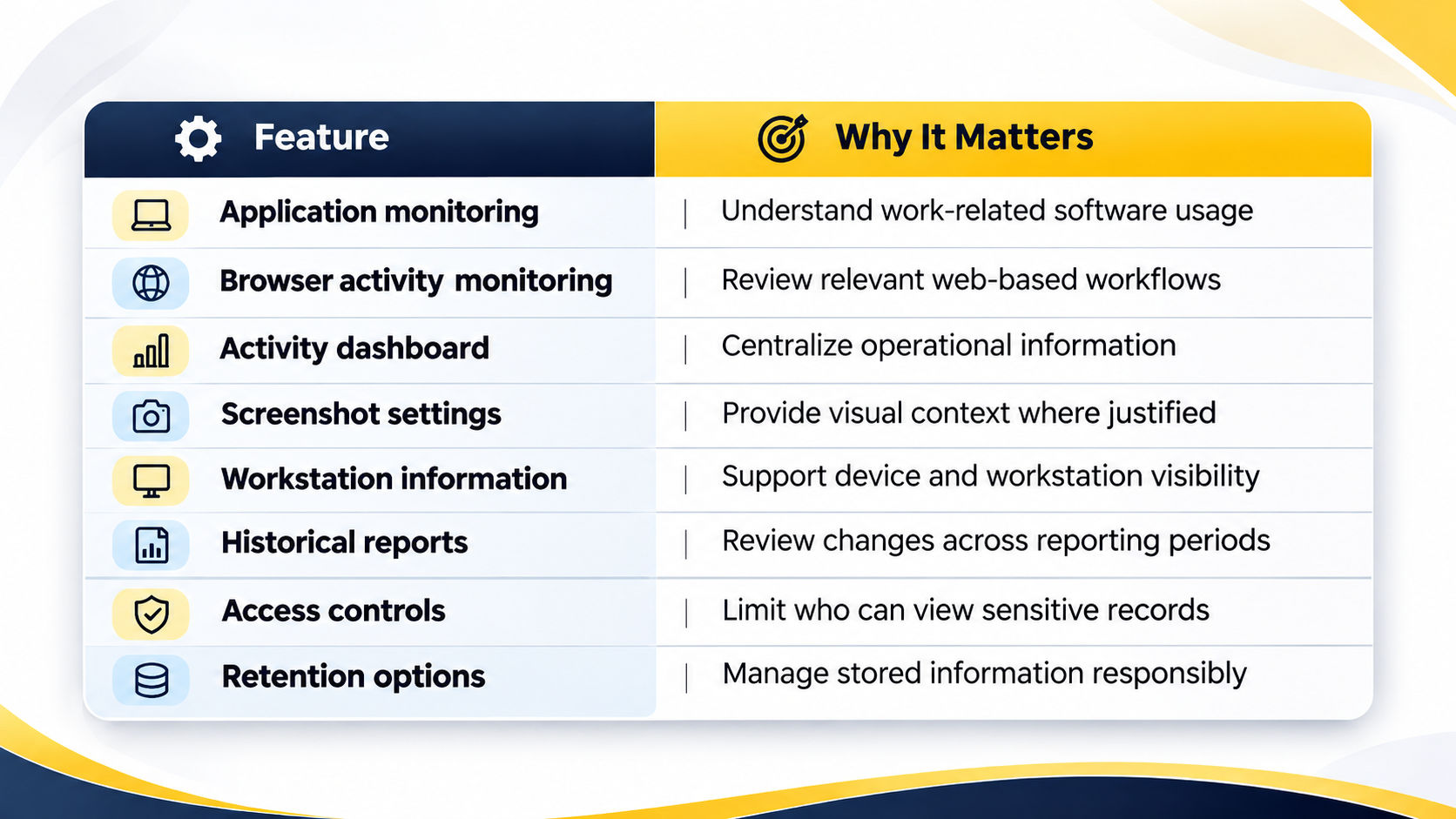
Confirm which features are included in each product and whether additional configuration or licensing is required.
Step 3: Evaluate Ease of Use
The platform should be practical for administrators and understandable to relevant users.
Consider whether managers can locate useful information quickly and whether dashboards communicate information clearly.
Step 4: Review Security and Privacy
Ask prospective vendors about:
Data storage locations.
Encryption and access controls.
Data retention and deletion.
Employee privacy settings.
Available security documentation.
Vendor support and incident procedures.
Do not assume every employee monitoring product provides the same security protections.
Step 5: Compare Pricing and Total Cost
Review subscription fees, device or user limits, implementation requirements, training, and support costs.
The lowest advertised price does not necessarily represent the lowest total cost.
Step 6: Request a Product Demonstration
Before selecting a solution, request a demonstration using realistic business scenarios.
A useful demonstration should show how administrators configure the platform, locate reports, interpret activity information, and manage relevant permissions.
This helps determine whether the software is a suitable match for your organization.
Final Thoughts
Employee monitoring software can help modern businesses understand digital workflows, evaluate application usage, and manage distributed workplace operations.
However, effective employee monitoring is not about collecting the maximum amount of employee data. It is about collecting appropriate information and using it responsibly.
Organizations that combine clear monitoring policies, useful analytics, strong data protection practices, and outcome-based management are better positioned to benefit from workforce monitoring technology.
As businesses plan their workforce management strategies for 2027, choosing the right employee monitoring system can be an important part of building efficient and transparent operations.
Explore Octopus Employee Monitoring Software
Looking for a centralized solution to understand workplace computer activity and support workforce management?
Octopus Employee Monitoring Software, developed by SkillersZone LLC, provides tools for reviewing application and browser activity, managing workstation visibility, and accessing monitoring information through centralized dashboards.
Explore how Octopus can support your organization's workforce monitoring needs while maintaining appropriate privacy and administrative controls.
Request a Product Demo | Contact SkillersZone LLC
Website: https://skillerszone.com/
Frequently Asked Questions About Employee Monitoring Software
1. What is employee monitoring software used for?
Employee monitoring software is used to collect and organize relevant workplace activity information. Businesses may use it to understand digital workflows, review application usage, manage workstations, and support operational decisions.
2. Is employee monitoring software legal in the United States?
Employee monitoring may be lawful in certain workplace contexts, but legal requirements vary by federal and state law, the monitoring method, the device involved, and the type of information collected.
Businesses should evaluate notice, consent, privacy, labor, and data protection obligations before implementation.
3. Can employee monitoring software measure productivity?
Employee monitoring software can measure certain activities and usage patterns, but these are not complete measures of productivity.
Businesses should combine relevant activity information with job-specific outcomes, work quality, and other appropriate performance indicators.
4. What is the difference between employee tracking software and workforce monitoring software?
Employee tracking software may focus on work time, task progress, attendance, or activity records.
Workforce monitoring software typically focuses on observing and analyzing aspects of workplace operations.
The terms overlap, and specific functionality varies by provider.
5. Can employee monitoring software help manage remote teams?
Yes. Appropriate monitoring tools can provide information about certain digital workflows and workstation activities.
However, effective remote management also depends on clear goals, communication, trust, collaboration, and output-based performance evaluation.
6. Does employee monitoring software record everything employees do?
Not necessarily.
Data collection depends on the software's actual capabilities, configuration, permissions, and monitoring policies.
Businesses should understand precisely what information a product collects before deploying it.
7. How do I choose employee monitoring software for a small business?
Start by identifying operational needs, then evaluate relevant features, usability, cost, security, support, and privacy controls.
A product demonstration is often useful for determining whether the system fits your existing workflows.