
Amazon Listing Optimization Checklist: The A-to-Z Guide Every Seller Needs in 2026
I have spent 15 years watching sellers bleed money on Amazon, not because their products were bad, but because their listings were invisible.
A listing is not just a product page. It is your 24/7 salesperson. Get it wrong, and every ad dollar you spend is money poured into a leaking bucket. Get it right, and it works for you around the clock.
Here is the exact Amazon listing optimization checklist I use, built from real data, real mistakes, and real results.
Why Amazon Listing Optimization Is the #1 Lever You're Ignoring
Amazon has over 600 million products listed on its marketplace. Your product is one of them.
The top 3 listings on page one capture 60% of all clicks. If you are not on page one, you are essentially invisible.
And the financial stakes are higher than most sellers realize. A listing converting at 8% versus 15% effectively doubles the cost of every ad click you generate. That is not a small problem. That is a business model problem.
The good news? Most of your competitors have not done this properly. Let us change that for you.
The 3 Systems Your Listing Must Win in 2026
Before diving into the checklist, you need to understand what you are actually optimizing for. In 2026, Amazon runs three discovery systems simultaneously.
1. The A10 Algorithm — The Foundation
This is Amazon's core search engine. It matches keywords in your listing to what shoppers type in the search bar. It rewards keyword relevance, sales velocity, conversion rate, and seller authority.
The rule is simple: your most important keywords belong in your title and bullet points. Secondary and long-tail keywords go in backend search terms.
2. COSMO — Amazon's Semantic Knowledge Graph
COSMO moved Amazon beyond simple keyword matching. It understands the relationship between products, features, and shopper intent.
When Amazon rolled COSMO out to just 10% of U.S. search traffic, it drove a 0.7% increase in purchases and an 8% lift in shopper engagement. That is the power of semantic search.
COSMO rewards listings that connect features to real-world use cases — not just listings stuffed with keywords.
3. Rufus AI — The New Conversion Kingmaker
Rufus is Amazon's generative AI shopping assistant, and it is reshaping how products get found.
It handles 274 million daily queries
Rufus-assisted sessions drove an estimated $10 billion in incremental sales
Shoppers who use Rufus are 60% more likely to complete a purchase
Rufus reads your entire listing from title, bullets, A+ content, images, reviews, and Q&A. It answers shoppers' natural-language questions using that content. If your listing does not answer real buyer questions, Rufus cannot advocate for your product.
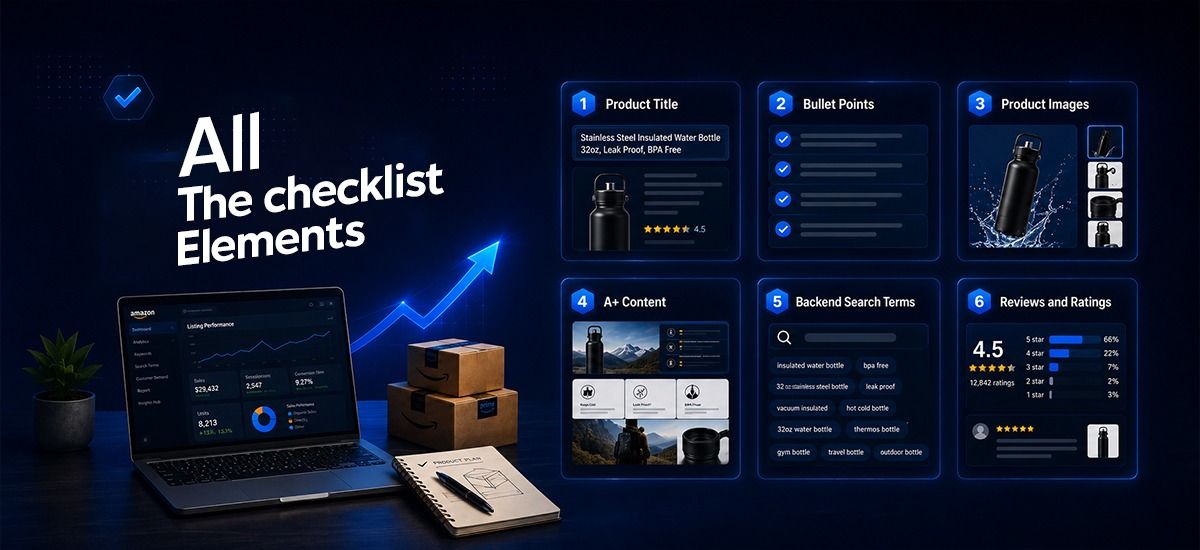
The Amazon Listing Optimization Checklist (Element by Element)
Step 1: Product Title — Your First and Most Critical Impression
Your title carries the heaviest weight in Amazon's keyword algorithm. It also determines your click-through rate from search results.
Title optimization rules:
Keep it under 80 characters where possible — mobile displays truncate at 70–80 characters
Lead with your primary high-volume keyword — never bury it
Include: Brand → Product Type → Key Features → Size/Color/Variant
Avoid keyword stuffing — COSMO now actively penalizes unnatural phrasing
Since January 2025, Amazon automatically corrects non-compliant titles within 14 days if sellers fail to fix them
Example of a weak title: "Garlic Press Stainless Steel Kitchen"
Example of a strong title: "Garlic Press — Easy Squeeze, Dishwasher Safe, No Peeling Required | Heavy Duty Stainless Steel"
The second title answers real buyer hesitations. That is the difference.
Step 2: Bullet Points — Convert the Browsers into Buyers
Your bullet points are your second most powerful ranking and conversion tool. In 2025, Amazon even added bullet point A/B testing to Seller Central — a clear signal of how seriously Amazon takes this section.
What the data says: Replacing spec-only bullets with benefit-led copy addressing the top 3 review objections drove an average 1.8 percentage point CVR improvement per ASIN.
Bullet point checklist:
Use all 5 available bullet points
Lead each bullet with a benefit — not just a feature
Use capital letters at the beginning to draw in scanning eyes.
Include secondary keywords naturally — do not force them
Address the top objections shoppers raise in competitor reviews
Think in questions Rufus might answer — "Is this easy to clean?" "Will this fit my countertop?" Build those answers into your bullets
Step 3: Product Images — The Silent Sales Force
Images are the #1 conversion lever on Amazon. Most sellers underestimate just how much a weak image set costs them.
Over 60% of Amazon traffic is mobile. That means your image set is often the only thing shoppers engage with before making a decision.
Image optimization checklist:
Main image: Pure white background, product filling at least 85% of the frame, no text or graphics (mandatory per Amazon policy)
Use a minimum 3,000 x 3,000px resolution for zoom capability
Images 2–3: Lifestyle shots showing the product in real-world use
Images 4–5: Infographic-style images with key features, dimensions, ingredients
Ensure all child ASINs/variants have a complete, consistent image set
Preview every image on mobile before publishing — rendering differs significantly from desktop
Confirm images match your attribute data — a mismatch (e.g., image shows a 3-pack, listing says single unit) drives returns and listing suppression
Step 4: A+ Content — Stop Treating It as Optional
If you are brand-registered and not using A+ Content, you are leaving money on the table. Full stop.
Amazon's own internal data shows listings with A+ Content see 3–10% higher conversion rates and a 5–8% increase in traffic. Brands using Premium A+ Content report up to 20% higher conversions.
And here is the critical 2026 update: Rufus reads A+ Content modules. Your brand story, FAQ modules, and comparison tables are all feeding Amazon's AI assistant with the context it needs to recommend your product.
A+ Content checklist:
Include a hero banner with one clear value proposition
Add a comparison table — between your own products (not competitors)
Build a brand story module — Rufus reads this to understand your product's "why"
Add an FAQ module — these map directly to Rufus conversational queries
Do NOT repeat your bullet points verbatim — go deeper: manufacturing process, certifications, sourcing
Aim for 5 focused modules — fewer, stronger modules outperform cluttered content
Step 5: Backend Search Terms — The Hidden Ranking Engine
Backend keywords are invisible to shoppers but indexed by Amazon's algorithm. You get 249 bytes to work with.
Backend keyword rules:
No duplicate keywords — if "stainless steel bowl" is in your title, do not repeat it here
Include synonyms: "mixing bowl" in title → add "prep bowl," "baking bowl," "salad bowl" in backend
Add common misspellings — shoppers do not always type perfectly
Include abbreviations relevant to your niche
Never include competitor brand names — policy violation risk
Step 6: Reviews and Ratings — The Trust Engine
Reviews are a major ranking factor in Amazon's algorithm — far more so than in traditional Google SEO.
Review optimization checklist:
Actively use Amazon's Request a Review button for every fulfilled order
Respond to all negative reviews — publicly, professionally, quickly
Seed your listing with real Q&A entries that address common pre-purchase questions (Rufus uses these directly)
Monitor competitor reviews to identify gaps your listing can address in bullets and A+ content
Stalling at a low review count (e.g., stuck at 51 reviews for 6 months) is a CVR ceiling you built yourself — treat review velocity as an ongoing priority
The 5 Amazon Listing Optimization Mistakes That Are Killing Your Sales
Mistake 1: Keyword Stuffing Your Title COSMO penalizes it. Rufus ignores it. Shoppers hate it. Stop.
Mistake 2: Ignoring Mobile Over 60% of Amazon traffic is mobile. If your images and copy do not work on a 5-inch screen, most of your traffic is bouncing.
Mistake 3: Building a "Set It and Forget It" Listing. The algorithm changed three times in 2025 alone. A listing optimized in 2023 may actually be hurting you now. Revisit every 90 days minimum.
Mistake 4: Neglecting A+ Content. Among high-traffic ASINs generating 60–70% of conversion losses, the single most common issue is missing A+ Content.
Mistake 5: Writing for Algorithms Instead of Humans In 2026, Amazon's systems have evolved to reward natural, benefit-driven language. Write for your customer first. The algorithm will follow.

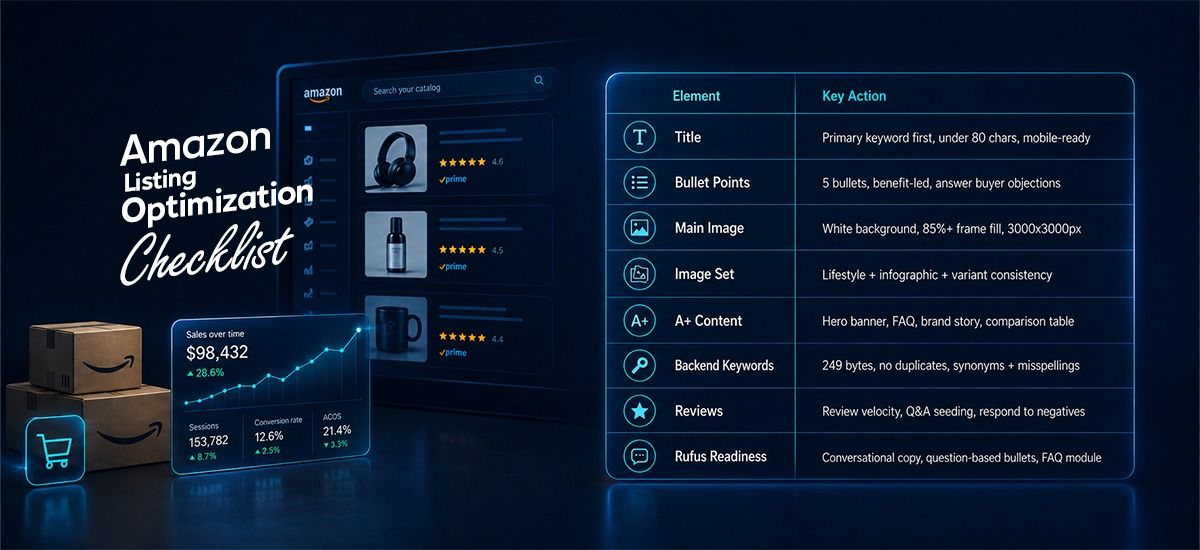
Your Quick-Reference Amazon Listing Optimization Checklist
The Reality Check Conclusion (Read This Carefully)
Here is the truth no one wants to say out loud: an optimized listing is not a magic switch. It is a system.
The sellers who win long-term on Amazon treat their listings like living documents — continuously tested, updated, and refined. A full listing refresh (title, bullets, A+, backend keywords) produces a median CVR lift of 4.2 percentage points over 90 days. That is not a small number. That is the difference between a struggling ASIN and a bestseller.
The tools exist. The data is available. The checklist is right in front of you.
Now the only question is: are you going to keep guessing, or start optimizing?
New Amazon sellers can learn how to structure, launch, and optimize their advertising campaigns in our complete Amazon PPC for new sellers guide.
Your Burning Amazon Listing Questions — Answered Honestly
How long does it take to see results after optimizing a listing?
Typically 2–6 weeks for measurable CVR changes — shorter for image updates (1–2 weeks), longer for backend keyword indexing. Do not judge results in the first 14 days.
Does A+ Content directly improve my Amazon search ranking?
Not directly — but it boosts conversion rate, which is a direct ranking factor. It also feeds Rufus, which is now a major traffic source. So yes, indirectly, absolutely.
What is the ideal Amazon product title length in 2026?
Category-specific limits range from 80 to 200 characters, but Amazon recommends staying under 80 characters since mobile shows only 70–80. Keep it tight and keyword-rich.
How many backend keywords can I use on Amazon?
You have 249 bytes total. Use synonyms, alternate spellings, abbreviations, and common misspellings — no duplicates from your front-end copy.
What is Rufus, and do I really need to optimize for it?
Rufus is Amazon's AI shopping assistant with 250+ million users and a 60% higher purchase rate among users who interact with it. Yes — optimizing for Rufus is now non-negotiable.
Can I include competitor brand names in my backend keywords?
No. Amazon's policy prohibits this, and it risks listing suppression. Focus on descriptive synonyms and long-tail intent terms instead.
How often should I update my Amazon product listing?
At a minimum, review every 90 days. After any major algorithm update, after a seasonal shift, or when your CVR drops by more than 2%, revisit immediately.
Is keyword stuffing in bullet points still effective in 2026?
Actively harmful in 2026. COSMO and Rufus reward natural, benefit-driven language. Keyword stuffing reduces readability and signals low-quality content to the algorithm.
What image format performs best on Amazon listings?
JPEG for main images (white background, 3000x3000px minimum). Use the secondary image slots for lifestyle shots and infographics. Always preview on mobile before publishing.
For a new seller with zero reviews, where should I start optimization?
Start with your title and main image — these drive click-through rate and first impressions. Then prioritize backend keywords and bullet points. Reviews will follow if the listing converts; a bad listing will not get reviews worth having.