
Amazon PPC for New Sellers: The A–Z Guide (2026)
You're Losing Money Right Now, And You Don't Even Know It
Here's an uncomfortable truth: most new Amazon sellers spend their first ad dollars and get almost nothing back.
Not because Amazon PPC doesn't work, but because they jump in without understanding how the game is actually played.
I've been in the e-commerce marketplace for 15 years. I've worked with beginner sellers who blew $500 on their first campaign and gave up.
I've also worked with sellers who started small, learned the system, and scaled to six figures in under a year.
The difference? They understood Amazon PPC before they spent a single dollar.
This guide is everything I wish I could hand every new seller at the start. No fluff. No hype. Just the real mechanics of how Amazon PPC works and how to use it to grow.
Amazon PPC 101: What It Is and Why It's Non-Negotiable for New Sellers
Amazon PPC (Pay-Per-Click) is Amazon's built-in advertising system. You bid for your product to appear in front of shoppers searching for items like yours. You only pay when someone actually clicks your ad, not for impressions.
The platform is officially called Amazon Advertising (previously Amazon Marketing Services, or AMS). The name changed, but the concept is the same: bid, win a placement, pay per click.
Here's why this matters especially for new sellers: when you have zero sales history and zero organic ranking, PPC is your fastest route to visibility. It buys you placement on page one from day one.
Key Insight: PPC doesn't just drive sales, it builds organic ranking. Every click and conversion sends a relevance signal to Amazon's A9 algorithm. Sellers who master PPC early climb the organic rankings faster.
The 3 Types of Amazon Ads (and Which One to Start With)
Amazon Advertising has three core ad formats. Here's the honest breakdown for new sellers:
1.Sponsored Products — Your Starting Point
Sponsored Products promote a single ASIN in search results and on product detail pages. They're the most widely used format and the best starting point for beginners. No brand registry needed. You pay per click. Results are measurable from week one.
When a shopper types in a keyword, your sponsored product ad can appear at the top of page one — even if your organic rank is on page five.
2.Sponsored Brands — For Brand-Registered Sellers
Sponsored Brands display your logo, a custom headline, and multiple products in a banner format at the top of search results. These are powerful for brand awareness but require Amazon Brand Registry. Start here only once your Sponsored Products campaigns are profitable and stable.
One major advantage: Sponsored Brand Video ads are heavily underutilized. Fewer sellers compete there, which often means lower CPCs and stronger click-through rates.
3.Sponsored Display — Retargeting on and off Amazon
Sponsored Display lets you reach shoppers who viewed your product but didn't buy, or target competitor product pages. It works both on Amazon and on external websites. This is an advanced tool — powerful once you have traction, unnecessary in the first 30 days.
Beginner Rule: Start with Sponsored Products. Master it. Then layer in Sponsored Brands and Sponsored Display once you have real conversion data.
How Amazon PPC Actually Works: The Mechanics Behind Every Click
Understanding the auction model is what separates sellers who scale from those who keep burning budget. Here's how each click actually happens:
A shopper types a search query into Amazon.
Amazon runs a real-time auction among all sellers bidding on that keyword.
Your ad's placement is determined by your bid amount, your listing's relevance, and your historical performance.
If your ad wins the placement and the shopper clicks it, you pay, but only the amount needed to beat the next-highest bidder, not your full maximum bid.
If the shopper buys, Amazon records an attributed sale, and it counts toward your ACoS.
This is why your listing quality matters as much as your bid. A perfectly optimized listing with a lower bid can outrank a poorly optimized one with a higher bid.
Match Types: The Levers You Control
In manual campaigns, you choose how your keywords match shopper searches. There are three match types:
Broad Match — Amazon shows your ad for searches related to your keyword, including synonyms and variations. Wide reach, less control. Great for discovery.
Phrase Match — Your keyword must appear within the search query, in order. More controlled than broad. Good for targeted expansion.
Exact Match — Your ad only shows when the shopper types your exact keyword. Maximum control, maximum precision. This is where you scale your best keywords.
Pro Tip: Start auto campaigns for discovery, then graduate your best-converting search terms into exact-match manual campaigns. This is the most efficient bidding structure for new sellers.
The Metrics That Actually Tell You If Your Amazon PPC Is Working
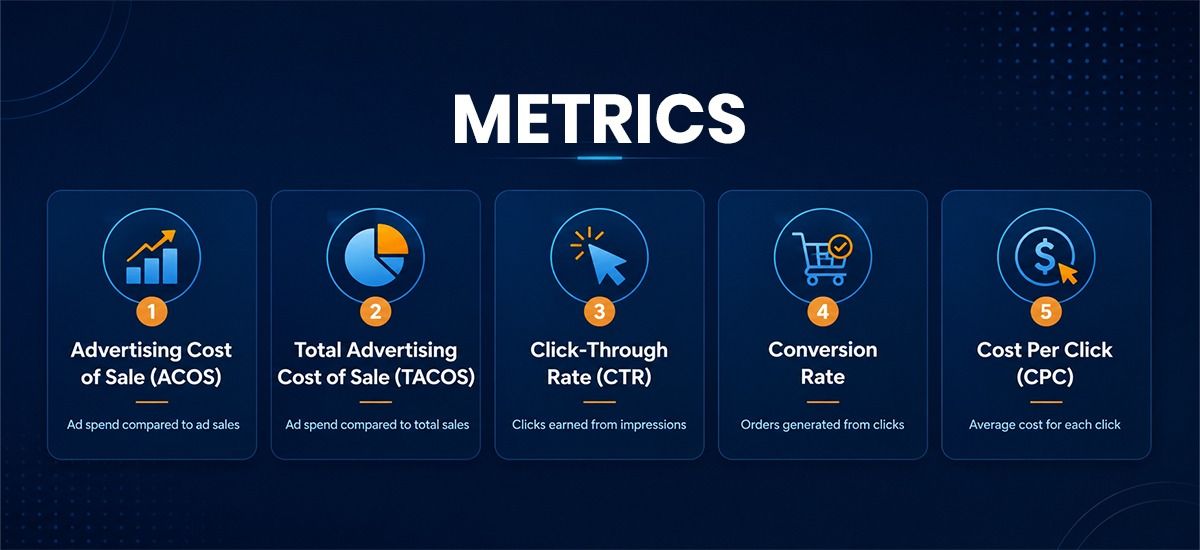
Most beginners check one number: ACoS. That's not enough. Here's the full dashboard you need to monitor:
ACoS — Advertising Cost of Sale
ACoS = (Ad Spend ÷ Ad Revenue) × 100. This tells you what percentage of your ad-attributed sales went to ad costs. A good ACoS depends entirely on your profit margin.
During launch, expect ACoS of 30–50%. That's normal, you're buying data. Once validated, aim to bring ACoS below your break-even point (typically your profit margin percentage).
TACoS — Total Advertising Cost of Sale
TACoS = (Ad Spend ÷ Total Revenue) × 100. This is the big-picture metric. It includes organic sales in the denominator.
If TACoS is declining while total revenue grows, your ads are building organic momentum. That's exactly what you want. If TACoS rises and revenue stalls, you're spending more without building anything.
CTR — Click-Through Rate
CTR = Clicks ÷ Impressions. A low CTR (under 0.3%) usually means your main image isn't compelling, your price isn't competitive, or your ad is showing for irrelevant keywords.
Conversion Rate
Conversion Rate = Orders ÷ Clicks. The Amazon average across categories is roughly 10–15% for Sponsored Products. If yours is lower, the problem is your listing — not your bids. Fix the listing first, then scale.
CPC — Cost Per Click
CPC varies by category and keyword competitiveness. On Amazon, CPCs typically range from $0.20 to $3.00+. Highly competitive categories like supplements or electronics can push significantly higher.
Data Check: In 2023, Amazon's average CPC across all categories was approximately $0.77. However, top keywords in competitive niches regularly exceed $2–$5 per click. Know your category baseline before setting budgets.
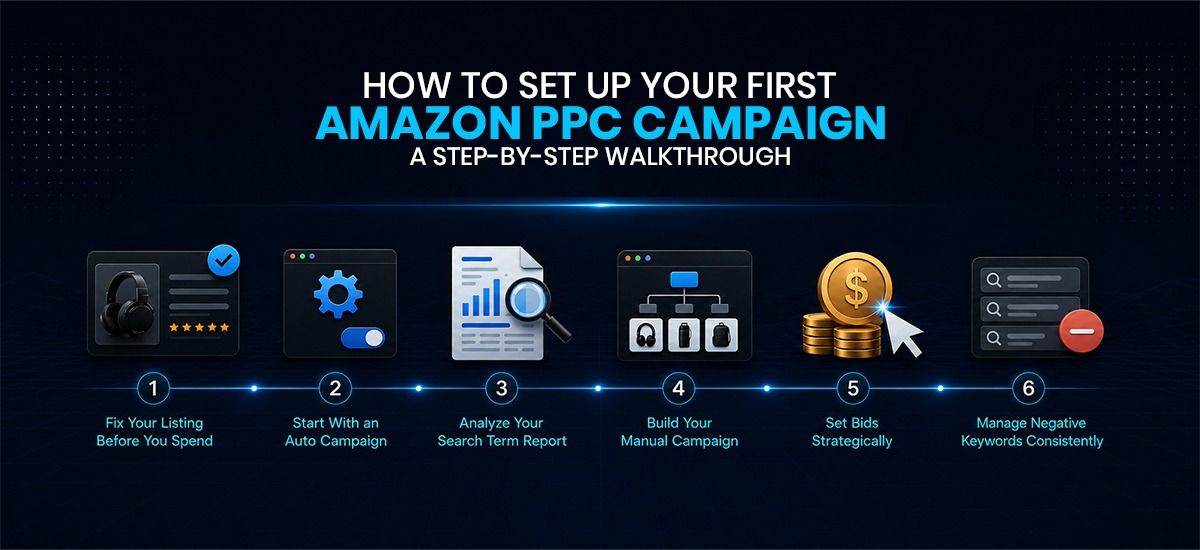
How to Set Up Your First Amazon PPC Campaign: A Step-by-Step Walkthrough
Let's get practical. Here's exactly how to launch your first campaign the right way:
Step 1: Fix Your Listing Before You Spend
No amount of ad spend will save a bad listing. Before launching, audit these four things:
Main image — Is it high-quality, with a white background, and scroll-stopping?
Title — Does it include your primary keyword naturally?
Bullet points — Do they address the buyer's real concerns, not just features?
Price — Are you within the competitive range for your category?
Conversion rate below category average? Fix the listing first. Ads bring the traffic; your listing closes the sale.
Step 2: Start With an Auto Campaign
Create one Sponsored Products Auto campaign. Set a modest daily budget ($15–$30 to start). Let it run for 7–10 days. Amazon will match your product to search terms that it thinks are relevant.
Your job during these first days: collect data. Don't panic at a high ACoS. You're buying information.
Step 3: Analyze Your Search Term Report
After 7–10 days, download your search term report from Seller Central (Reports > Advertising Reports). Look for:
Search terms that generated sales — these are gold. Move them to manual campaigns with exact match.
Search terms that got clicks but zero sales — these are a waste. Add them as negative keywords immediately.
Step 4: Build Your Manual Campaign
Take your winning search terms and launch a manual Sponsored Products campaign. Use exact match for your proven converters. Add phrase match for close variations. Keep your auto campaign running; it keeps discovering new terms.
Step 5: Set Bids Strategically
Start with Amazon's suggested bids as a baseline, but don't just accept them. Use your break-even ACoS to calculate your maximum CPC:
Formula: Max CPC = (Product Price × Profit Margin %) ÷ 100. If your item sells for $30 and you have a 30% margin, your break-even CPC is $9 × conversion rate.
Adjust bids weekly — increase bids for high-performing keywords limited by impressions, reduce bids where ACoS is inflated.
Step 6: Manage Negative Keywords Consistently
Negative keywords are one of the most powerful tools you have. A standard rule of thumb: if a search term gets 30+ clicks with zero sales, add it as a negative exact keyword. Don't let Amazon keep burning your budget on searches that don't convert for you.
Your Amazon PPC Budget Strategy: How Much Should You Actually Spend?
This is the question every new seller asks, and it doesn't have a universal answer. But here's a realistic framework:
Launch Phase (First 30–60 days): $20–$50/day. Focus on data collection, not profitability. Your goal is to find what converts.
Growth Phase (Months 2–4): Scale budget toward your winning keywords only. ACoS should trend downward as you eliminate waste.
Maturity Phase: Maintain efficient campaigns. TACoS should be declining. Organic sales carry more weight. PPC becomes a defense and supplement tool.
Some operators recommend starting with $5–$10/day if the budget is tight. That's fine, but recognize that lower budgets mean slower data, which means slower learning. Allocate what you can sustain for at least 30 days without expectations of immediate profit.
Reality Check: One operator reported achieving a 40% conversion rate increase simply by fixing their listing — without changing their ad budget at all. Before scaling spend, audit your listing conversion rate first.
7 Amazon PPC Mistakes New Sellers Make (and How to Avoid One)
After 15 years and hundreds of sellers, these are the mistakes I see over and over:
Running only auto campaigns forever. Auto discovers; manual scales. You need both.
Never adding negative keywords. Your budget silently bleeds into irrelevant searches daily.
Judging campaigns after 3 days. Amazon has a 48–72 hour data attribution window. Give campaigns at least 2 weeks before concluding.
Increasing bids when ACoS is high. High ACoS usually means poor conversion. Fix the listing, not the bid.
Advertising a product with thin margins. If your margin is 10%, there's no room for an ACoS above 10%. You'll lose money on every click.
Using one campaign for everything. Separate discovery (auto) from scaling (manual exact). Mixed campaigns give you mixed data.
Chasing top-of-search placement always. Product page placements often convert at a lower cost. Test all placements before committing budget to top-of-search only.
Advanced Move: How Amazon PPC Feeds Your Organic Ranking
Here's a concept that most beginner guides skip entirely, and it's one of the most powerful reasons to invest in PPC early.
Every purchase driven by your ad tells Amazon's algorithm that your product is relevant for that keyword. Over time, consistent ad sales push your organic ranking higher for those same keywords.
This means a smart PPC strategy doesn't just generate immediate sales, it builds free, organic traffic over time. When you track your TACoS declining while total revenue grows, you're watching this flywheel in action.
The Real Talk: Amazon PPC Is Powerful, But It's Not Magic
Let's be honest about something. Amazon PPC is one of the most effective advertising systems in e-commerce today. It puts your product in front of buyers who are actively looking to purchase. That's an incredibly valuable thing.
But here's the reality check: PPC is a tool, not a shortcut. It won't fix a bad product. It won't compensate for a listing that doesn't convert. And it won't make you profitable if your margins are paper-thin.
Used correctly, Amazon PPC can take a validated product from invisible to dominating page one within 60–90 days. Used incorrectly, it's just an expensive way to get clicks that go nowhere.
Start small. Learn the system. Add negative keywords. Move winners into manual exact match. Track TACoS — not just ACoS. And fix your listing before you scale your budget.
The sellers who win on Amazon long-term aren't the ones who spend the most on ads. They're the ones who understand what their data is telling them — and act on it.
That's the game. And now you know how to play it.
The Flywheel: PPC sales → Better organic ranking → More organic sales → Lower TACoS → More room in budget to scale PPC further. This is how top Amazon sellers grow efficiently.
To track this in real time: monitor your target keywords' organic rank week over week while running active campaigns. Tools like Helium 10’s Cerebro, or SellerSprite’s Keyword Tracker, let you see exactly which keywords are climbing organically.
Still Burning Questions? Here Are Your Answers — No Gatekeeping
1.What exactly is Amazon PPC, in simple terms?
Amazon PPC is a paid advertising system where you bid to show your product in search results or on other product pages. You only pay when someone clicks your ad — not just for it to appear.
2.How much does Amazon PPC typically cost per click?
The average CPC across Amazon is around $0.77, but it varies widely by category. Competitive niches can push $2–$5+ per click. Research your category's typical CPC before setting your budget.
3.Should I use auto or manual targeting as a beginner?
Start with an auto campaign to collect data for 7–10 days. Then build manual campaigns using the search terms that actually converted. Run both simultaneously for best results.
4.What is a good ACoS for Amazon PPC?
During launch, 30–50% ACoS is normal. Once your campaigns are optimized, aim to bring ACoS below your product's profit margin percentage, that's your break-even point.
5.How long before I see results from Amazon PPC?
Expect meaningful results after 7–14 days. Profitability typically takes 30–60 days of consistent optimization. Anyone promising overnight results is not being straight with you.
6.What is TACoS, and why does it matter more than ACoS?
TACoS measures ad spend against total revenue, including organic sales. It's the real health metric. Declining TACoS with growing revenue means your PPC is building organic traction; that's the goal.
7.Can Amazon PPC help my product rank organically?
Yes, this is one of PPC's most powerful secondary benefits. Ad-driven sales signal keyword relevance to Amazon's algorithm, which, over time, improves your organic ranking for those keywords.
8.What's the minimum daily budget for Amazon PPC?
Amazon allows budgets as low as $1/day, but that's not practical for learning. Start with $15–$30/day for meaningful data collection. Lower budgets mean slower learning — plan accordingly.
9.What are negative keywords, and why are they critical?
Negative keywords stop your ad from showing for irrelevant searches. Without them, Amazon will quietly spend your budget on clicks from shoppers who will never buy your product. Review and add negatives weekly.
10.Do I need Brand Registry for Amazon PPC?
No Sponsored Products (the most important ad type for beginners) doesn't require Brand Registry. You only need it for Sponsored Brands and some Sponsored Display features. Start with Sponsored Products.
Before running ads, make sure you choose the right product first. You can also check our guide on the best Amazon product research tools for beginners to find profitable products with lower risk.