
How to Monitor Remote Employee Productivity Without Micromanaging
Managing a remote team requires more than checking whether employees are online. Business owners and managers need to understand whether projects are moving forward, employees have the resources they need, and work is being completed effectively.
However, constantly checking employee activity can create unnecessary pressure, reduce trust, and distract everyone from meaningful business goals.
This is why remote employee productivity monitoring should focus on measurable outcomes, transparent communication, and useful workforce insights rather than constant supervision.
With the right approach, businesses can monitor remote employees responsibly, identify workflow challenges, and improve operational efficiency without micromanaging their teams.
In this guide, we'll explore practical strategies for measuring remote team productivity, choosing appropriate performance metrics, using monitoring dashboards effectively, and building a transparent workplace culture.
Challenges of Managing Remote Teams
Remote work offers businesses greater flexibility and access to talent beyond their local area. However, managing distributed employees introduces several challenges.
Unlike traditional office environments, managers cannot always observe how daily work progresses or identify problems through casual workplace conversations.
This makes clear communication, structured reporting, and effective performance measurement especially important.
1. Limited Visibility Into Workflows
Managers may know what tasks employees have been assigned but have limited insight into the processes involved in completing those tasks.
For example, a remote marketing team may use project management software, design platforms, communication applications, and reporting tools throughout the day.
Without clear workflow information, managers may struggle to identify unnecessary steps or technical difficulties.
Appropriate remote workforce monitoring can provide additional context about work-related computer activities.
However, activity information should supplement project updates and employee feedback rather than replace them.
2. Communication and Collaboration Gaps
Remote employees may work across different time zones, making spontaneous communication more difficult.
Delayed responses, unclear responsibilities, and missing project updates can slow progress.
These problems are not necessarily signs of low productivity.
In many cases, better documentation, clear deadlines, and agreed communication practices can improve coordination.
3. Difficulty Measuring Meaningful Productivity
One of the biggest challenges in remote management is deciding how productivity should be measured.
Some organizations mistakenly focus on hours spent online or how frequently employees interact with their computers.
However, these measurements do not necessarily reflect the quality or value of completed work.
A graphic designer may spend several hours developing one effective design, while a customer support representative may complete dozens of relatively short interactions.
Both roles require different productivity measurements.
4. Employee Isolation and Workload Imbalance
Remote employees may experience communication difficulties, unclear expectations, or uneven workloads.
Without regular conversations, managers may overlook employees who need assistance.
Frequent activity checks are not a substitute for employee support.
Effective remote team management combines performance expectations with communication, resources, and reasonable workloads.
5. Maintaining Trust Across Distributed Teams
Trust is essential for successful remote work.
Employees need reasonable autonomy to complete their assignments, while managers need confidence that business objectives are being met.
Excessive surveillance can damage this relationship.
A balanced monitoring strategy creates accountability through clear expectations and appropriate information rather than continuous supervision.
Set Output-Based Productivity Goals
The foundation of effective remote employee productivity monitoring is measuring results instead of simply measuring computer activity.
Output-based management evaluates the work employees complete and how well that work meets organizational expectations.
Define Clear Goals for Each Role
Every employee should understand what successful performance looks like.
For example:
Content writers: Deliver approved articles that meet editorial and quality requirements.
Graphic designers: Complete assigned designs according to project specifications.
Customer support agents: Resolve customer issues accurately and professionally.
Software developers: Complete agreed development tasks and maintain appropriate code quality.
Sales representatives: Maintain qualified opportunities and meet relevant sales objectives.
These expectations should be realistic, measurable, and connected to the employee's responsibilities.
Use SMART Goals
SMART goals provide a useful framework for defining employee objectives.
SMART stands for:
Specific: Clearly describe the expected result.
Measurable: Identify how successful completion will be assessed.
Achievable: Ensure the goal is realistic with available resources.
Relevant: Connect the objective to business priorities.
Time-bound: Establish an appropriate deadline.
For example, instead of telling a content writer to remain active for eight hours, a manager could assign two well-researched articles with agreed deadlines and quality requirements.
This provides a clearer measure of work completed.
Choose Role-Specific Productivity Metrics
Different roles require different performance indicators.
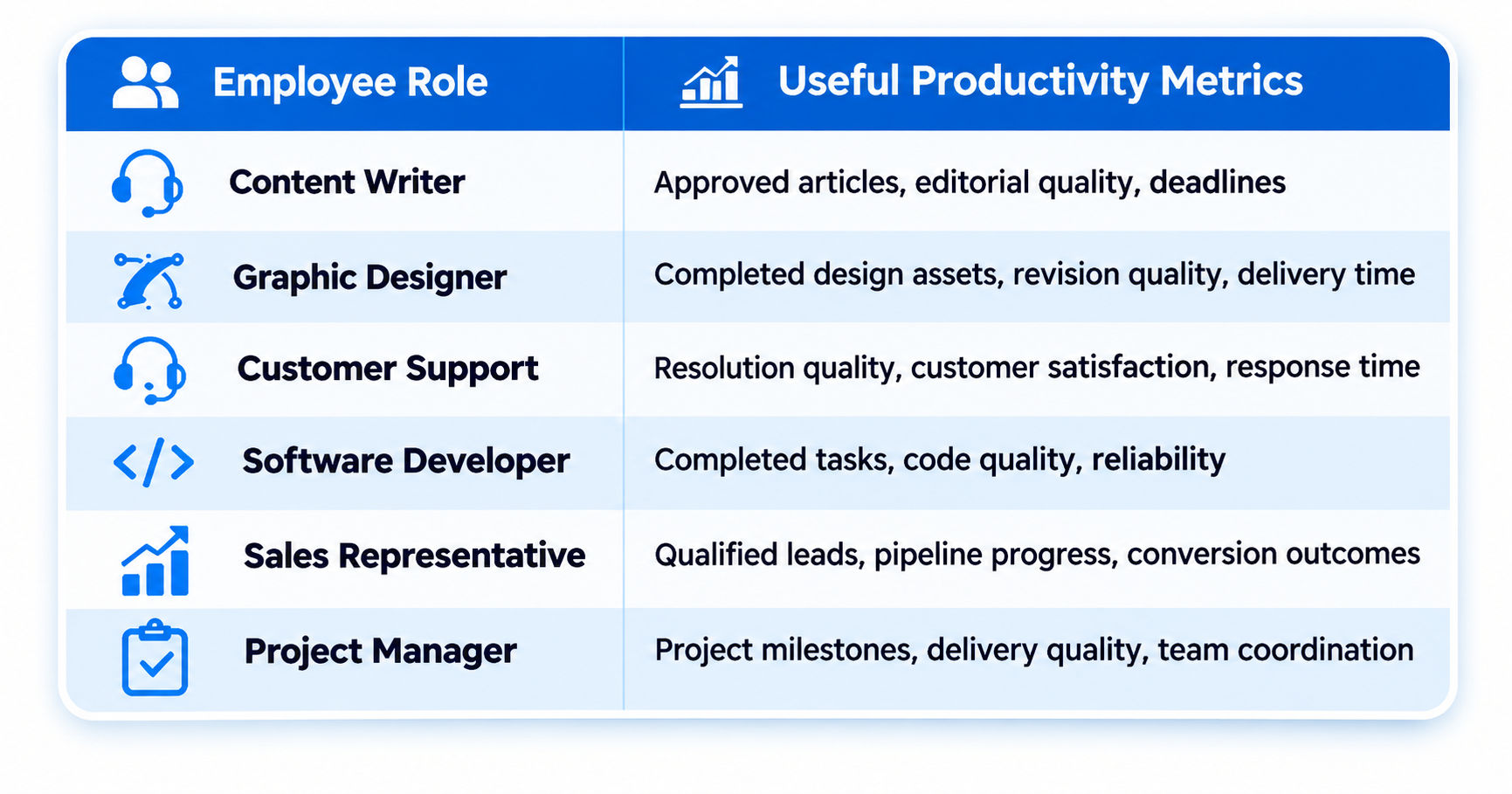
Managers should avoid using identical metrics for employees performing fundamentally different jobs.
Track Progress Through Regular Reviews
Weekly or biweekly progress reviews can help managers understand whether employees are achieving their objectives.
These discussions should cover completed work, upcoming priorities, challenges, and support requirements.
The goal is to identify obstacles and improve performance, not to create unnecessary reporting obligations.
Measure App Usage and Workflow Patterns Appropriately
Employee monitoring software can provide information about work-related application usage and computer activity.
These insights may help organizations understand how digital workflows operate.
However, managers must interpret activity information carefully.
Understand What Application Usage Data Can Show
Depending on the monitoring platform, application usage reports may show which programs were active during particular periods.
For example, a marketing employee may regularly use:
Design software.
Spreadsheet applications.
Project management platforms.
Communication tools.
Web-based reporting dashboards.
These records can help managers understand the digital tools involved in daily operations.
However, application usage does not reveal the complete quality, purpose, or effectiveness of the work.
Identify Potential Workflow Problems
Suppose a remote customer support team frequently switches between a customer management system, a spreadsheet, and an internal communication platform.
This could indicate that employees are required to enter similar information into multiple systems.
A manager might investigate whether the workflow could be simplified.
The resulting improvement could reduce administrative effort and make work easier.
This is a more constructive use of activity information than treating every application change as a distraction.
Avoid Misinterpreting Inactivity
Computer inactivity can occur for many legitimate reasons.
Employees may be:
Participating in phone conversations.
Reading printed documents.
Planning or reviewing assignments.
Attending offline meetings.
Taking approved breaks.
Solving technical problems.
Therefore, inactivity should not automatically be categorized as unproductive behavior.
Combine Activity Data With Business Results
The most useful approach is to interpret activity records alongside relevant business outcomes.
For example, an employee might show relatively little computer activity but consistently complete high-quality assignments.
Another employee might demonstrate high activity levels while missing important deadlines.
The second employee's activity does not necessarily indicate stronger performance.
Key principle: Measure the value of completed work, not just the volume of recorded activity.
Use Dashboards Without Micromanaging
Monitoring dashboards can provide centralized access to workplace activity information.
When used responsibly, they can help managers recognize workflow trends and identify areas that deserve attention.
However, dashboards should support management decisions rather than become tools for constant individual surveillance.
Focus on Trends Instead of Every Action
Rather than checking whether each employee is active throughout the day, managers can review appropriate operational patterns over longer reporting periods.
For example:
Are particular applications creating repeated workflow interruptions?
Does a team need additional software training?
Are employees reporting difficulties with existing systems?
Have recent workflow changes reduced unnecessary administrative tasks?
These questions provide more meaningful management insights than simply asking who was online most often.
Review Team-Level Patterns Where Appropriate
Aggregated reporting can be useful for understanding operational trends without unnecessarily focusing on individual employees.
For example, team-level application usage information may help identify training requirements or software adoption challenges.
Where possible, organizations should use aggregated information when individual-level monitoring is unnecessary.
Use Monitoring Information to Support Employees
Imagine that a remote team consistently experiences difficulties while using a particular business application.
Rather than criticizing employees for spending too much time in the application, management could investigate whether the software is slow, confusing, or poorly configured.
The organization might respond by providing training, improving documentation, or evaluating alternative software.
This approach uses workforce analytics to solve operational problems.
Establish Reasonable Dashboard Review Practices
Managers should define when and why monitoring dashboards will be reviewed.
For example, a weekly operational review may be sufficient for certain business objectives.
Continuous monitoring is not automatically necessary or appropriate.
Access to detailed records should be limited to authorized personnel with legitimate business responsibilities.
Build Transparency and Employee Trust
Trust plays a major role in remote workforce management.
Employees who understand expectations and have reasonable autonomy are better positioned to work confidently.
Monitoring practices should therefore be transparent, proportionate, and consistent with applicable privacy requirements.
Explain Why Monitoring Is Necessary
Before implementing remote workforce monitoring, organizations should clearly explain its purpose.
For example, a company may want to understand workplace application usage, support workstation administration, or evaluate digital workflows.
Employees should know which business objectives monitoring is intended to support.
Establish a Written Employee Monitoring Policy
A clear monitoring policy should explain:
What information is collected.
Which devices and applications are covered.
When monitoring takes place.
Whether screenshots or detailed activity records are collected.
Who can access monitoring information.
How long collected data is retained.
How employees can ask questions or raise concerns.
Policies should be communicated in understandable language.
Respect Employee Privacy
Organizations should avoid collecting information that is unnecessary for a legitimate business purpose.
Special care is needed when employees use personal devices, access personal accounts, or work from home.
Monitoring may involve sensitive information, particularly when screenshots or browser activity records are collected.
Before implementing monitoring, employers should review applicable employment, privacy, and data protection laws.
In the United States, requirements can vary depending on federal and state law, monitoring methods, and the information collected.
Protect Collected Information
Employee monitoring information may contain confidential business data and personal information.
Organizations should assess the software provider's security practices, access controls, retention settings, and data deletion procedures.
Monitoring records should only be available to authorized individuals.
Encourage Employee Feedback
Employees should have opportunities to discuss monitoring policies and explain any concerns.
Feedback can also help managers identify circumstances that activity data does not accurately represent.
Transparent monitoring supports accountability while recognizing that employees deserve privacy, clear expectations, and fair treatment.
Best Practices for Remote Workforce Monitoring
Businesses can create a more balanced monitoring strategy by combining clear performance expectations, responsible technology use, and consistent communication.
1. Start With Business Objectives
Identify the problem your organization is trying to solve before choosing monitoring tools.
Examples include improving workflow visibility, understanding application usage, or managing distributed workstations.
Avoid collecting detailed employee activity information without a specific need.
2. Prioritize Outcomes Over Activity
Use job-specific performance indicators such as completed assignments, quality standards, and customer outcomes.
Treat computer activity records as supporting information rather than definitive performance scores.
3. Choose Appropriate Monitoring Features
Not every organization needs continuous screenshots, detailed activity logs, or extensive individual reporting.
Select monitoring capabilities based on legitimate business requirements.
Consider less intrusive methods when they can achieve the same objective.
4. Communicate Expectations Clearly
Employees should know what work is expected, how progress is evaluated, and what monitoring practices apply.
Clear expectations reduce uncertainty and unnecessary supervision.
5. Establish Regular Check-Ins
Use scheduled conversations to discuss project progress, workload, challenges, and support requirements.
These meetings can provide important context that monitoring dashboards cannot capture.
6. Evaluate Workflows, Not Just Individuals
If productivity concerns emerge, investigate whether the problem involves unclear processes, inadequate tools, unrealistic workloads, or insufficient training.
Avoid assuming the cause is individual employee behavior.
7. Review Monitoring Policies Periodically
Businesses should periodically assess whether their monitoring practices remain necessary and proportionate.
Review data retention, access permissions, employee feedback, and applicable legal requirements.
Example: A Balanced Remote Monitoring Strategy
Consider a digital marketing agency managing a remote team of 20 employees.
The agency uses project management software to assign tasks and measure delivery outcomes.
It also uses appropriate employee monitoring software to understand business application usage and investigate workflow issues.
Every week, managers review completed assignments, client feedback, upcoming deadlines, and relevant operational patterns.
If unusual application usage appears, managers discuss the situation with the team rather than immediately assuming poor performance.
Employees understand the monitoring policy and can raise concerns.
This approach combines accountability with autonomy.
How Octopus Supports Remote Teams
Octopus Employee Monitoring Software, developed by SkillersZone LLC, is designed to support workforce monitoring and workplace activity visibility.
For organizations managing remote and hybrid employees, Octopus provides relevant tools for reviewing work-related computer activity and workstation information.
Application Activity Monitoring
Octopus enables authorized administrators to review application activity information.
This can provide context about digital tools used in workplace operations and help managers investigate workflow patterns.
Browser Activity Monitoring
Octopus includes browser activity monitoring capabilities that can support visibility into relevant workplace website usage.
Organizations should configure monitoring practices according to their business needs and applicable privacy requirements.
Screenshot Monitoring
Octopus includes screenshot management functionality.
Businesses should evaluate available configuration controls, permissions, and data retention options before using screenshots.
Screenshot monitoring should be limited to situations where it is necessary and proportionate.
Centralized Workforce Dashboard
Octopus provides a centralized dashboard for reviewing available monitoring information.
This can help administrators access relevant activity records and workstation data through a common interface.
Workstation Visibility
Octopus supports visibility into monitored workplace computers.
This may help organizations manage distributed workstation information and review relevant operational records.
When Should Businesses Consider Octopus?
Octopus may be relevant for organizations that need:
Visibility into work-related computer activity.
Application and browser usage information.
Configurable screenshot monitoring.
Centralized monitoring dashboards.
Workstation activity information.
Additional operational context for remote workforce management.
Before adopting the platform, organizations should confirm its current features, supported devices, privacy controls, security practices, and pricing.
A product demonstration can help determine whether Octopus fits the company's workflow requirements.
Final Thoughts
Effective remote employee productivity monitoring requires a balance between business visibility, employee autonomy, and responsible management.
Businesses should not rely on constant surveillance or computer activity scores to determine whether remote employees are productive.
Instead, they should establish clear expectations, measure meaningful work outcomes, communicate regularly, and use workforce analytics to investigate operational challenges.
Employee monitoring software can support this approach by providing additional information about workplace computer activity and digital workflows.
However, its value depends on how responsibly the organization uses that information.
For businesses managing distributed teams, combining transparent monitoring policies with outcome-based performance management can create a more practical and sustainable approach to remote work.
See How Octopus Supports Remote Teams
Looking for a centralized way to review workplace activity and support remote workforce management?
Octopus Employee Monitoring Software, developed by SkillersZone LLC, provides application and browser activity monitoring, screenshot management, workstation visibility, and centralized monitoring dashboards.
Explore how Octopus can help your organization understand digital workflows and access relevant workplace activity information while maintaining appropriate privacy controls.
See How Octopus Supports Remote Teams
Explore Octopus Features | Request a Product Demo
Developed by: SkillersZone LLC
Website: https://skillerszone.com/
Frequently Asked Questions About Remote Employee Productivity Monitoring
1. How can businesses monitor remote employee productivity?
Businesses can monitor remote employee productivity by establishing clear goals, tracking relevant work outcomes, reviewing project progress, and using appropriate workforce analytics.
Computer activity information can provide additional context but should not replace performance-based evaluation.
2. What is the best way to monitor remote employees without micromanaging?
The best approach is to focus on measurable outcomes, clear communication, reasonable autonomy, and transparent monitoring policies.
Managers should avoid repeatedly checking individual activity when regular progress reviews can provide sufficient information.
3. Can employee monitoring software improve remote team productivity?
Employee monitoring software may help organizations identify workflow inefficiencies, application usage patterns, and operational challenges.
However, productivity improvements depend on whether managers use these insights to make meaningful changes.
Monitoring software alone does not guarantee better performance.
4. What metrics should managers use to measure remote team productivity?
Useful metrics depend on the employee's role.
Examples include completed assignments, project milestones, work quality, customer satisfaction, response accuracy, and agreed performance objectives.
Activity data may supplement these measurements but should not replace them.
5. Is remote employee monitoring legal in the United States?
Remote employee monitoring may be lawful in certain workplace contexts, but requirements vary by jurisdiction, monitoring method, device ownership, and the type of information collected.
Employers should review applicable federal and state laws and obtain professional legal guidance where necessary.
6. Does computer activity accurately measure employee productivity?
No. Computer activity provides information about certain interactions with a device, not a complete measurement of productivity.
Employees may perform valuable work while offline, reading, planning, collaborating, or communicating with customers.
7. What are the risks of excessive employee monitoring?
Excessive monitoring can create privacy concerns, reduce employee trust, increase administrative work, and lead to inaccurate conclusions about performance.
Organizations should collect only necessary information and use it for clearly defined purposes.
8. What should businesses look for in remote workforce monitoring software?
Businesses should evaluate relevant functionality, ease of use, reporting capabilities, privacy controls, security, implementation requirements, pricing, and vendor support.
The chosen software should address actual operational needs without collecting unnecessary data.